




Introduction
Artificial intelligence has transformed from an emerging technology into an everyday productivity partner. Whether you’re writing emails, designing presentations, creating videos, coding software, conducting research, or organizing projects, AI tools can now complete tasks that once required hours of manual work. In 2026, the AI industry has become more competitive than ever, with dozens of platforms offering specialized features for different types of users.
While many companies have introduced premium subscription plans with advanced capabilities, several AI platforms still provide remarkably generous free versions. These tools allow users to experience cutting-edge artificial intelligence without spending money, making them ideal for students, freelancers, educators, business professionals, content creators, and developers.
The secret to maximizing AI isn’t downloading every available application. Instead, successful users build a small collection of complementary tools that work together. By selecting the right AI assistant for research, writing, design, coding, and productivity, anyone can dramatically improve efficiency while keeping costs at zero.
Why Free AI Tools Are More Powerful Than Ever
The quality of free AI software has improved significantly over the past few years.
Modern AI assistants can understand natural language, generate realistic images, summarize lengthy documents, write professional emails, translate languages, create presentations, analyze data, and even write computer code.
Unlike earlier AI systems that required technical expertise, today’s tools are designed for everyday users. Simple conversations are enough to generate useful results.
Because competition among AI companies continues to increase, free users now receive access to features that were previously reserved only for paid subscribers.
Perplexity: The Ultimate AI Research Assistant
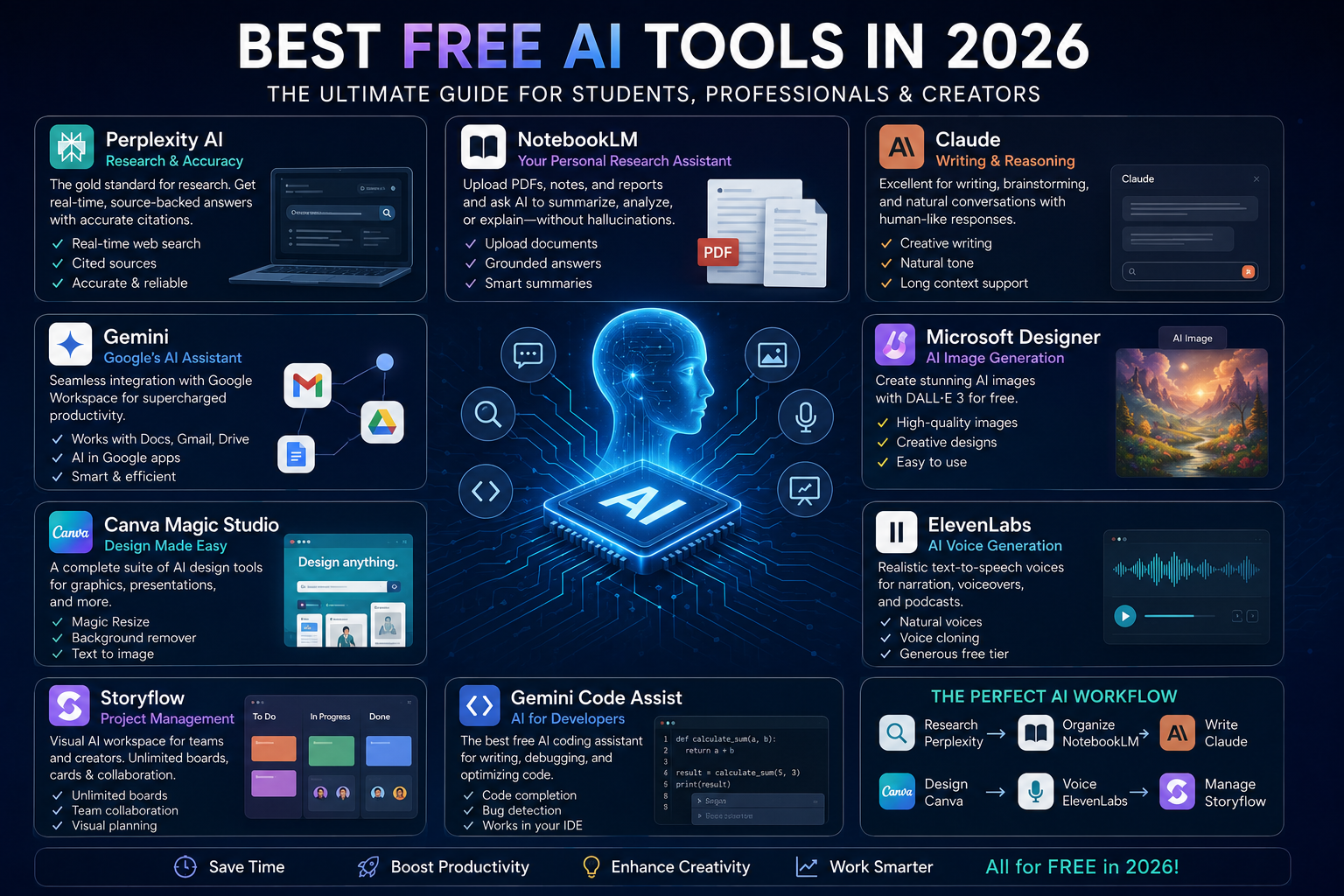
Research has changed dramatically thanks to Perplexity AI.
Instead of searching through dozens of websites and comparing multiple articles, users receive summarized answers supported by reliable citations.
This makes Perplexity particularly valuable for students, journalists, researchers, educators, and professionals who require trustworthy information.
Unlike traditional search engines, Perplexity explains complex topics in conversational language while providing links to original sources for verification.
Whether you’re preparing a presentation, writing an academic report, comparing products, or learning about a new topic, Perplexity significantly reduces research time.
Best For
- Academic research
- Fact-checking
- Market analysis
- Product comparisons
- Learning new topics
NotebookLM: Your Personal AI Research Partner
NotebookLM has become one of the most useful AI tools for working with personal documents.
Users can upload PDFs, reports, lecture notes, meeting transcripts, ebooks, and research papers.
Instead of searching the internet, NotebookLM answers questions based only on the uploaded material, greatly reducing the chances of inaccurate or fabricated information.
Students use it for exam preparation.
Researchers summarize hundreds of pages within minutes.
Business professionals quickly review lengthy reports before meetings.
Because responses remain grounded in your own documents, NotebookLM has become one of the most trusted productivity tools available.
Best For
- Studying
- Summarizing PDFs
- Research papers
- Company documents
- Meeting notes
Claude: The Best AI for Writing
Claude continues to establish itself as one of the strongest AI writing assistants available.
Its conversational tone feels remarkably natural, making it ideal for producing articles, emails, blog posts, business reports, scripts, marketing copy, and creative stories.
One of Claude’s biggest strengths is maintaining context during long conversations.
Instead of losing track of earlier instructions, Claude produces coherent documents while preserving writing style and consistency.
Many professionals use Claude as a personal editor, helping improve clarity, grammar, tone, and readability.
Best For
- Blog writing
- Business communication
- Storytelling
- Editing
- Long-form content
Gemini: Google’s AI Assistant
Gemini offers one of the most integrated AI experiences available.
Because it connects with Google’s ecosystem, users can seamlessly interact with Gmail, Google Docs, Google Drive, Google Sheets, and Calendar.
Students benefit from research assistance.
Office workers automate document creation.
Business teams streamline collaboration.
Developers also appreciate Gemini’s programming support, making it useful beyond simple conversations.
For anyone already using Google Workspace daily, Gemini becomes an extremely valuable assistant.
Best For
- Google Workspace
- Productivity
- Email writing
- Document creation
- Coding assistance
Microsoft Designer: Free AI Image Generation
Visual content has become increasingly important across social media, blogs, presentations, and marketing campaigns.
Microsoft Designer offers high-quality AI image generation powered by advanced image models.
Users simply describe an image using natural language, and the AI produces unique artwork within seconds.
The platform also helps create invitations, social media posts, advertisements, presentations, and promotional graphics.
Its beginner-friendly interface makes professional design accessible even without graphic design experience.
Best For
- AI artwork
- Marketing graphics
- Posters
- Presentations
- Social media content
Canva Magic Studio
Canva has evolved far beyond a simple graphic design platform.
Magic Studio includes numerous AI-powered features including:
- Background removal
- Magic Resize
- Text generation
- Image enhancement
- Presentation creation
- Design suggestions
- Generative fill
These tools allow creators to produce professional-quality designs quickly without advanced editing skills.
Teachers, entrepreneurs, marketers, and influencers continue relying on Canva because of its ease of use and enormous template library.
Best For
- Graphic design
- Presentations
- Instagram posts
- YouTube thumbnails
- Business branding
ElevenLabs: AI Voice Generation
ElevenLabs has become the leading platform for realistic AI voice generation.
Its text-to-speech engine produces natural human voices with impressive emotional expression and pronunciation accuracy.
Content creators use it for YouTube narration.
Businesses create advertisements.
Authors convert books into audio.
Educators produce learning materials.
Podcasters generate voiceovers without recording equipment.
The generous free plan allows users to experience premium-quality AI narration without subscription costs.
Best For
- Voiceovers
- Podcasts
- Audiobooks
- Video narration
- Educational content
Storyflow: Smarter Project Management
Project planning has become increasingly visual.
Storyflow combines AI with collaborative workspaces where teams organize ideas using boards, cards, timelines, and visual workflows.
Instead of juggling multiple productivity apps, users can brainstorm, plan, assign tasks, and monitor progress within a single environment.
The free version supports generous collaboration features, making it suitable for startups, students, and creative teams.
Best For
- Team collaboration
- Project management
- Brainstorming
- Planning
- Productivity
Gemini Code Assist
Programming has become much easier thanks to AI coding assistants.
Gemini Code Assist helps developers write cleaner code, identify bugs, explain unfamiliar programming concepts, and generate solutions faster.
Whether you’re building websites, mobile apps, APIs, or software projects, AI-powered coding significantly improves productivity.
Students learning programming also benefit because explanations remain beginner-friendly.
Best For
- Programming
- Debugging
- Learning code
- Software development
- Automation
How to Build the Perfect AI Workflow
Many beginners believe they need every AI tool available.
In reality, productivity improves by combining only a few specialized tools.
For example:
Step 1: Research information using Perplexity.
Step 2: Upload research into NotebookLM for organization and summarization.
Step 3: Polish the final article using Claude.
Step 4: Create visuals with Microsoft Designer.
Step 5: Design graphics using Canva.
Step 6: Generate narration through ElevenLabs.
This workflow allows creators to produce professional-quality content efficiently without spending money.
Choosing the Right AI Tool
Different users have different needs.
Students benefit most from NotebookLM, Gemini, and Perplexity.
Writers often prefer Claude alongside Perplexity.
Designers combine Microsoft Designer with Canva.
Developers rely on Gemini Code Assist.
Businesses integrate several tools depending on their workflows.
Rather than searching for one “perfect” AI, the best strategy is selecting tools that complement one another.
The Future of Free AI
Artificial intelligence will continue evolving rapidly.
Future AI assistants will become more personalized, understand user preferences better, automate repetitive work, and integrate across multiple applications.
Competition among major technology companies is expected to improve free offerings even further, giving users access to increasingly powerful capabilities.
Businesses will continue adopting AI to improve efficiency, while individuals will rely on intelligent assistants for education, creativity, productivity, and communication.
Conclusion
The AI landscape in 2026 offers more opportunities than ever before, and many of the most capable tools remain accessible through generous free plans. Whether you’re a student conducting research, a writer creating content, a designer producing visuals, a developer writing code, or a business professional managing projects, there is an AI solution that can significantly improve your workflow without requiring a paid subscription.
The key to success is not using every AI platform available but building a focused toolkit that matches your goals. A combination of Perplexity for research, NotebookLM for document analysis, Claude for writing, Gemini for productivity, Microsoft Designer and Canva for visuals, ElevenLabs for audio, and Gemini Code Assist for coding can handle almost every daily task.
As AI continues to evolve, these free tools will become even more powerful, helping millions of users save time, boost creativity, and work more efficiently. In 2026, artificial intelligence is no longer a luxury—it has become an essential productivity partner that anyone can access for free.