





Introduction
The modern workplace has changed dramatically over the past few years. Success is no longer determined by who works the longest hours but by who works the smartest. Artificial intelligence has evolved from being a simple writing assistant into a powerful productivity partner capable of handling complex, multi-step workflows. Today’s professionals rely on AI not only to generate content but also to conduct research, organize schedules, automate repetitive tasks, analyze documents, manage meetings, and streamline creative projects.
The biggest trend of 2026 is the rise of agentic AI. Unlike earlier AI systems that simply responded to prompts, agentic AI tools understand goals, make decisions, connect with multiple applications, and complete tasks with minimal human intervention. They function more like digital teammates than traditional software.
Whether you are a student, entrepreneur, marketer, developer, business owner, or corporate employee, the right AI toolkit can save several hours every week while improving the quality of your work. The following ten tools represent the most influential productivity platforms available in 2026. Each excels in a specific area, helping professionals automate workflows, reduce manual effort, and focus on high-value work.
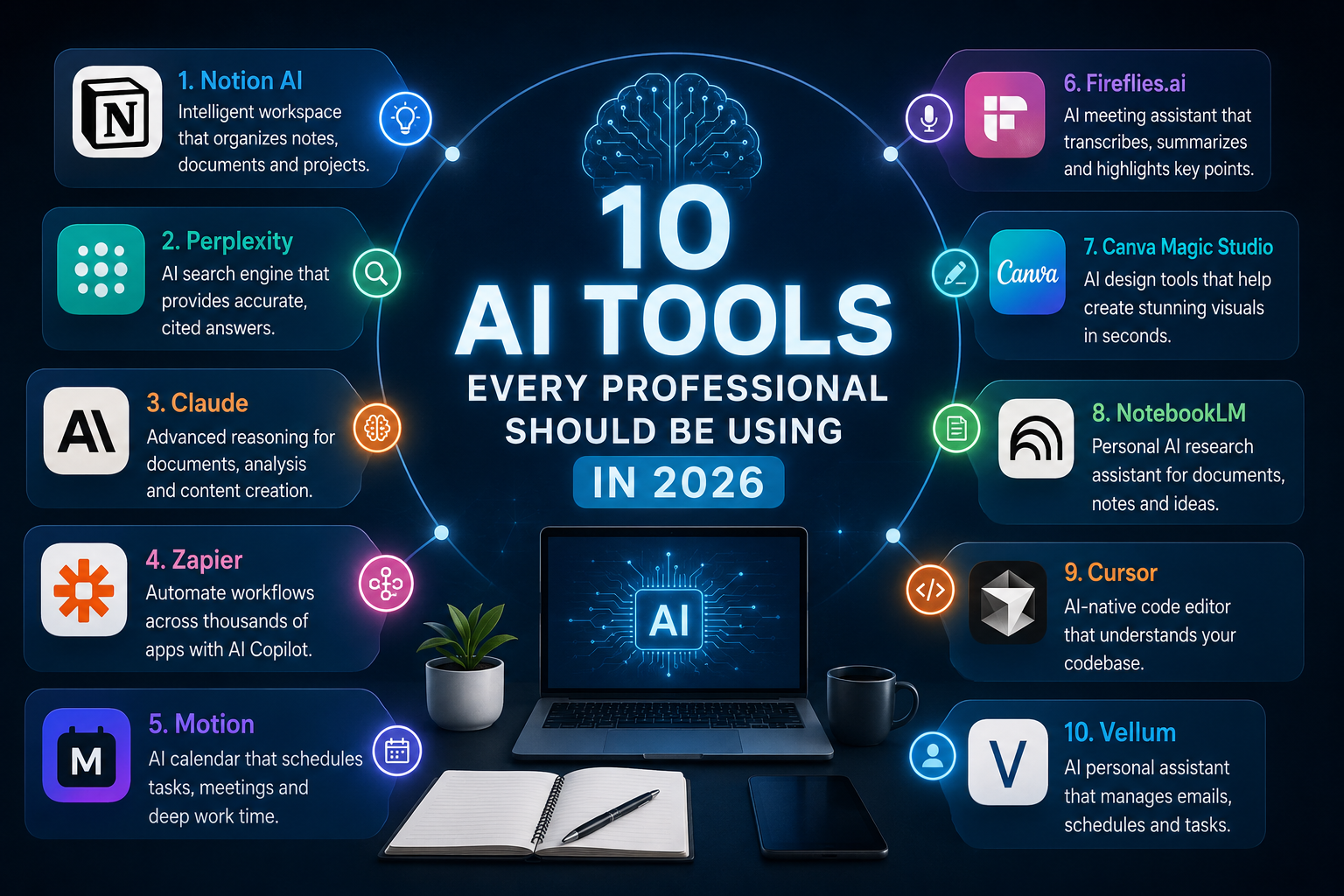
1. Notion AI – The Intelligent Knowledge Workspace
Notion has transformed from a simple note-taking application into one of the smartest productivity platforms available. Instead of treating your notes as isolated documents, Notion AI indexes your entire workspace, making every document, spreadsheet, meeting note, and project instantly searchable through natural language.
Instead of browsing dozens of pages to find information, users can simply ask questions like, “What decisions were made during last month’s marketing meeting?” or “Summarize our product roadmap for Q3.” Within seconds, Notion AI produces an accurate answer with references to the original documents.
Its writing assistant also helps draft reports, create meeting agendas, summarize brainstorming sessions, rewrite paragraphs, and organize scattered notes into structured documents.
For project management, Notion AI can generate task lists, identify overdue work, prepare weekly summaries, and assist team collaboration. Businesses using Notion often replace multiple software subscriptions because documents, databases, project management, and AI assistance all exist inside one workspace.
The platform has become an indispensable digital headquarters where information is no longer hidden but instantly accessible.
2. Perplexity – The Future of AI Research
Traditional search engines require users to open dozens of tabs before finding trustworthy information. Perplexity changes that entire experience by acting as an AI-powered research assistant.
Every search is analyzed across multiple reliable sources before the AI produces a comprehensive answer complete with citations. Instead of spending an hour collecting information manually, professionals receive an organized research report within minutes.
Perplexity excels at market research, competitor analysis, technical explanations, academic research, product comparisons, financial overviews, and current events.
Its ability to ask follow-up questions creates a natural research conversation rather than isolated searches. Users can continuously refine topics without starting over.
One of Perplexity’s greatest strengths is transparency. Every answer includes links to its sources, allowing users to verify information quickly.
For students, researchers, consultants, journalists, and business professionals, Perplexity has become the preferred alternative to conventional web searching.
3. Claude – The Best AI for Deep Thinking
Claude has earned its reputation as one of the strongest AI models for long-form reasoning and document analysis. While many AI systems perform well with short prompts, Claude excels when handling lengthy reports, contracts, research papers, technical documentation, and business strategies.
Its Artifacts feature creates an interactive workspace where generated documents, websites, code, spreadsheets, or presentations appear beside the conversation. Users can edit and improve content without losing context.
Claude is particularly valuable for reviewing legal agreements, summarizing research papers, analyzing financial documents, generating detailed business proposals, and writing comprehensive reports.
The model maintains logical consistency across large documents and produces thoughtful, structured responses that require minimal editing.
For professionals working with complex information, Claude functions less like a chatbot and more like an experienced analyst.
4. Zapier – The Automation Engine
Many professionals waste hours each week performing repetitive administrative work. Zapier eliminates much of this manual effort by connecting thousands of different applications together.
Its AI-powered automation builder allows users to describe workflows in plain English instead of creating complicated automation rules manually.
For example, after every Zoom meeting, Zapier can automatically generate a transcript, summarize the discussion, send follow-up emails, update a CRM system, create project tasks inside Notion, and notify team members through Slack.
Businesses also use Zapier to automate lead generation, invoice processing, customer support, marketing campaigns, employee onboarding, and sales reporting.
Because it integrates with thousands of popular applications, Zapier serves as the invisible infrastructure connecting an organization’s digital ecosystem.
The result is fewer repetitive tasks, fewer human errors, and significantly greater productivity.
5. Motion – The AI Calendar That Plans Your Day
Managing time has become increasingly difficult as professionals juggle meetings, deadlines, emails, and personal responsibilities.
Motion solves this challenge by functioning as a self-organizing calendar powered by artificial intelligence.
Instead of asking users to manually schedule every task, Motion automatically prioritizes work based on urgency, deadlines, estimated completion times, and meeting availability.
If a meeting is canceled, Motion instantly reallocates that time toward unfinished tasks. If a deadline changes, the entire schedule reorganizes automatically.
The platform protects deep work by blocking uninterrupted focus sessions while minimizing calendar conflicts.
Rather than simply displaying appointments, Motion actively manages time as a valuable resource.
For freelancers, executives, managers, and entrepreneurs balancing multiple priorities, Motion dramatically reduces scheduling stress.
6. Fireflies.ai – AI Meeting Intelligence
Meetings often generate valuable ideas that disappear because participants become too busy taking notes.
Fireflies.ai solves this problem by automatically joining online meetings across Zoom, Microsoft Teams, Google Meet, and other collaboration platforms.
The AI records conversations, creates accurate transcripts, identifies action items, extracts important decisions, and produces concise meeting summaries.
Instead of reviewing an entire hour-long meeting, users can jump directly to important moments through searchable transcripts.
Managers can monitor project progress, sales teams can analyze customer conversations, and remote teams can maintain clear documentation without additional administrative work.
Fireflies also integrates with project management software, customer relationship management systems, and communication platforms, allowing meeting insights to flow directly into existing workflows.
This enables participants to focus entirely on the discussion rather than note-taking.
7. Canva Magic Studio – AI-Powered Creative Design
Creating professional graphics once required advanced design skills and expensive software. Canva Magic Studio has dramatically lowered that barrier.
Its growing collection of AI-powered tools enables users to generate social media graphics, presentations, marketing materials, advertisements, videos, documents, logos, and promotional content within minutes.
Magic Design creates complete layouts from simple text prompts. Magic Write assists with content generation, while Magic Edit modifies images using natural language instructions.
Background removal, image expansion, object replacement, presentation generation, and text-to-image creation are now integrated into one easy-to-use platform.
Businesses save significant time by producing high-quality visual content without hiring dedicated designers for every project.
Whether creating presentations, YouTube thumbnails, Instagram posts, educational materials, or business proposals, Canva continues to simplify creative production.
8. NotebookLM – Your Personal Research Expert
NotebookLM represents one of Google’s most impressive productivity innovations.
Instead of relying on internet-wide knowledge, NotebookLM specializes in understanding documents that users personally upload.
Researchers can upload journal articles, students can upload textbooks, lawyers can upload case files, and businesses can upload internal documentation.
The AI then becomes an expert specifically on that collection of information.
Users can ask complex questions, request summaries, compare ideas across documents, identify trends, generate study guides, or create briefing reports without searching manually through hundreds of pages.
One of NotebookLM’s most unique features is its AI-generated podcast summaries that transform written research into conversational audio discussions.
Professionals can review reports while commuting, exercising, or traveling.
By grounding responses entirely within uploaded sources, NotebookLM minimizes hallucinations and increases factual reliability.
9. Cursor – The AI-Native Coding Environment
Software development has changed dramatically with the introduction of Cursor.
Rather than functioning as a traditional code editor, Cursor understands an entire project’s structure and assists developers throughout the software development lifecycle.
It generates code, fixes bugs, explains unfamiliar functions, refactors large projects, creates documentation, and even builds entirely new features from natural language instructions.
Because it understands the complete codebase context, Cursor provides suggestions that are significantly more accurate than traditional autocomplete tools.
Developers spend less time searching documentation and more time solving meaningful engineering problems.
Teams benefit from improved code quality, faster debugging, cleaner architecture, and accelerated software delivery.
As AI-assisted programming becomes mainstream, Cursor has positioned itself among the leading development environments available.
10. Vellum – Your AI Personal Assistant
Managing emails, calendars, reminders, follow-ups, and everyday administrative work often consumes a large portion of the professional workday.
Vellum addresses this problem by acting as an intelligent personal assistant capable of interacting with multiple applications simultaneously.
Unlike many automation tools that require complicated setup, Vellum allows users to communicate naturally.
Users can simply say, “Schedule a meeting next week, email everyone involved, and remind me the day before.”
The AI handles the necessary coordination across email, calendars, messaging platforms, and productivity applications.
It can prepare daily briefings, organize reminders, schedule appointments, draft responses, and automate routine communication.
By reducing administrative overhead, professionals gain more time for strategic thinking and creative work.
Why AI Productivity Tools Matter More Than Ever
The competitive advantage in 2026 is no longer determined solely by knowledge. Information is widely accessible. What separates high performers is their ability to process information quickly, automate repetitive work, and make faster decisions.
AI productivity platforms dramatically reduce time spent on administrative tasks while increasing accuracy and consistency.
Instead of replacing professionals, these tools amplify human capabilities by handling repetitive processes, organizing information, and providing intelligent assistance throughout the workday.
Organizations adopting AI-first workflows consistently complete projects faster, reduce operational costs, improve collaboration, and deliver better customer experiences.
The future workplace belongs to professionals who know how to effectively collaborate with intelligent software.
Final Thoughts
Artificial intelligence has become the foundation of modern productivity. The most successful professionals are no longer those who simply work harder—they are those who build intelligent workflows that allow technology to handle repetitive tasks while they focus on creativity, strategy, and decision-making.
Notion AI organizes knowledge. Perplexity transforms research. Claude excels at reasoning. Zapier automates workflows. Motion optimizes schedules. Fireflies captures meetings. Canva accelerates design. NotebookLM enhances research. Cursor revolutionizes software development. Vellum simplifies daily administration.
Together, these platforms represent the new generation of AI-powered productivity infrastructure.
As AI continues evolving beyond chatbots into fully autonomous digital assistants, professionals who adopt these technologies today will be better prepared for tomorrow’s increasingly automated workplace. Investing time in learning these tools is no longer optional—it is rapidly becoming one of the most valuable career decisions anyone can make in the AI era.