




Best AI Tools for Students in Pakistan: Study Smarter in 2026
AI tools are becoming part of student life in Pakistan. Whether you are in school, college, university, or learning a skill online, the right AI tools can help you study faster, organize notes, improve writing, prepare presentations, understand difficult topics, and practice for exams.
This trend is already visible in Pakistan. Google’s Pakistan Year in Search 2025 showed strong interest in AI tools such as Gemini, DeepSeek, Google AI Studio, Claude, and Grok, which means Pakistani users are actively searching for AI learning and productivity tools.
Pakistan also has a growing digital base. PTA reported that Pakistan crossed 200 million telecom subscribers, with 150 million broadband subscribers and more than 2 million FTTH subscribers, making online learning more accessible than before.
But students should use AI carefully. AI should help you learn, not replace your thinking. The best use of AI is to understand concepts, organize work, improve drafts, and practice better.
1. ChatGPT
ChatGPT is one of the best all-round AI tools for students. It can help with explanations, summaries, practice questions, study plans, coding help, writing improvement, and exam preparation.
OpenAI’s Study Mode is designed to help students work through problems step by step instead of simply giving direct answers. It is available to logged-in users on Free, Plus, Pro, and Team plans, with availability for ChatGPT Edu also mentioned by OpenAI.
Students in Pakistan can use ChatGPT for:
Understanding difficult topics
Creating study plans
Practicing interview questions
Explaining coding errors
Making flashcards
Improving English writing
Preparing presentation outlines
The best way to use ChatGPT is to ask it to teach you, question you, and test you. Do not only ask for final answers.
2. Google Gemini
Google Gemini is another useful AI assistant for students. It is helpful for explanations, summaries, brainstorming, writing, research support, and productivity tasks.
Gemini is especially useful for students who already use Google services like Gmail, Docs, Drive, and Search. It can help with study planning, topic understanding, and writing support.
For Pakistani students, Gemini can be useful in subjects like computer science, business, English, general science, history, and social studies.
3. NotebookLM
NotebookLM is one of the best AI tools for research and notes. Google describes NotebookLM as an AI research tool and thinking partner that can analyze your sources, turn complexity into clarity, and transform your content.
This is very useful for students because NotebookLM works around your own uploaded material. You can upload notes, PDFs, articles, lecture material, or research documents, then ask questions based on those sources.
Google also says students can use NotebookLM to generate flashcards, quizzes, study guides, and reports.
Students can use NotebookLM for:
Summarizing lecture notes
Understanding research papers
Preparing quizzes
Making study guides
Creating revision material
Organizing sources for assignments
This is one of the safest AI tools for research because it keeps the work connected to the material you provide.
4. Google AI Studio
Google AI Studio is useful for students interested in AI, coding, apps, and experiments with Gemini models. Google describes AI Studio as a fast path from prompt to production with Gemini, including features like Search and Maps grounding.
Google’s Gemini API pricing page also says Google AI Studio usage is free of charge in available regions.
This tool is best for:
Software engineering students
AI beginners
Prompt engineering practice
Testing Gemini models
Building small AI projects
Learning API basics
Creating prototype apps
For Pakistani computer science and software engineering students, Google AI Studio can be a strong starting point for learning practical AI development.
5. Grammarly
Grammarly is useful for students who want to improve English writing. It can help with grammar, tone, clarity, spelling, sentence structure, and writing suggestions.
Grammarly says its student-focused AI writing support can provide real-time writing feedback and help students improve their writing process. It also mentions tools that help students disclose AI use with integrity.
Students can use Grammarly for:
Assignments
Reports
Emails
CV writing
Cover letters
Research summaries
University applications
This is especially helpful for Pakistani students who understand a topic but struggle to express it clearly in English.
6. Canva AI
Canva is one of the best tools for presentations, posters, graphics, assignments, and project visuals. Canva describes itself as a free-to-use online graphic design tool for presentations, posters, social media posts, videos, logos, and more.
Students can use Canva for:
Class presentations
Assignment cover pages
Posters
Infographics
CV designs
Project reports
Social media graphics
Canva is useful because students do not need advanced design skills to create clean and professional-looking work.
7. Perplexity AI
Perplexity AI is useful for research because it works like an AI-powered answer engine. Perplexity describes itself as a free AI-powered answer engine that provides accurate, trusted, and real-time answers.
Students can use Perplexity for:
Topic research
Quick explanations
Finding sources
Comparing ideas
Getting recent information
Understanding current events
It is useful for research, but students should still verify sources before using information in assignments or presentations.
8. Claude
Claude is useful for long writing, summarizing, explaining complex ideas, and improving drafts. Students can use it for essay planning, report structuring, and understanding long documents.
Claude is especially useful when you need a cleaner writing style or want to improve the structure of a long answer. It can help with brainstorming, outlining, rewriting, and simplifying difficult content.
Students should still check facts and avoid submitting AI-written content without editing.
9. DeepSeek
DeepSeek became popular because many students use it for coding, reasoning, and technical explanations. It can help with programming questions, logic problems, mathematics explanations, and software development learning.
Pakistani students studying computer science, software engineering, data science, and AI can use DeepSeek to:
Understand code
Debug errors
Learn programming concepts
Practice algorithms
Explain technical topics
Create project ideas
The best use is learning and debugging, not copying complete code without understanding it.
10. QuillBot
QuillBot is useful for paraphrasing, summarizing, and improving writing. Students often use it to rewrite sentences and make writing clearer.
But it should be used carefully. Paraphrasing tools can easily create weak or unnatural writing if used blindly. Students should use it to improve clarity, not to hide copied content.
Best AI Tools by Student Need
For general study help, use ChatGPT or Gemini.
For research and notes, use NotebookLM or Perplexity.
For writing improvement, use Grammarly or ChatGPT.
For presentations and design, use Canva.
For coding help, use ChatGPT, DeepSeek, Gemini, or Google AI Studio.
For exam preparation, use ChatGPT Study Mode, NotebookLM quizzes, and Gemini.
For English improvement, use Grammarly and ChatGPT.
Best AI Tools for University Students
University students in Pakistan should focus on tools that help with research, writing, presentations, and career preparation.
The best combination is:
ChatGPT for learning and explanations
NotebookLM for notes and research
Grammarly for writing improvement
Canva for presentations
Perplexity for source discovery
Google AI Studio for AI and coding projects
This combination covers most academic needs without requiring too many tools.
Best AI Tools for School and College Students
School and college students should keep it simple. They do not need advanced tools.
The best starting tools are:
ChatGPT for explanations
Gemini for study help
Canva for presentations
Grammarly for English
NotebookLM for notes and revision
These tools can help with daily study, assignments, and exam preparation.
How Students Should Use AI Correctly
AI should be used as a tutor, not as a shortcut.
A good student uses AI to understand the topic, ask questions, practice, and improve weak areas. A weak student uses AI only to copy answers.
The right way to use AI is:
Ask for explanation
Ask for examples
Ask for quiz questions
Ask for feedback
Rewrite in your own words
Check facts from reliable sources
Follow your school or university rules
AI can improve learning if you stay honest and active.
Mistakes Students Should Avoid
Do not copy AI answers directly.
Do not submit AI-written assignments without understanding them.
Do not trust every AI answer.
Do not use fake citations.
Do not ignore your teacher’s instructions.
Do not depend on AI for every subject.
Do not use AI to cheat in exams or assignments.
AI can make students smarter if used properly, but it can also make students lazy if used incorrectly.
Final Verdict
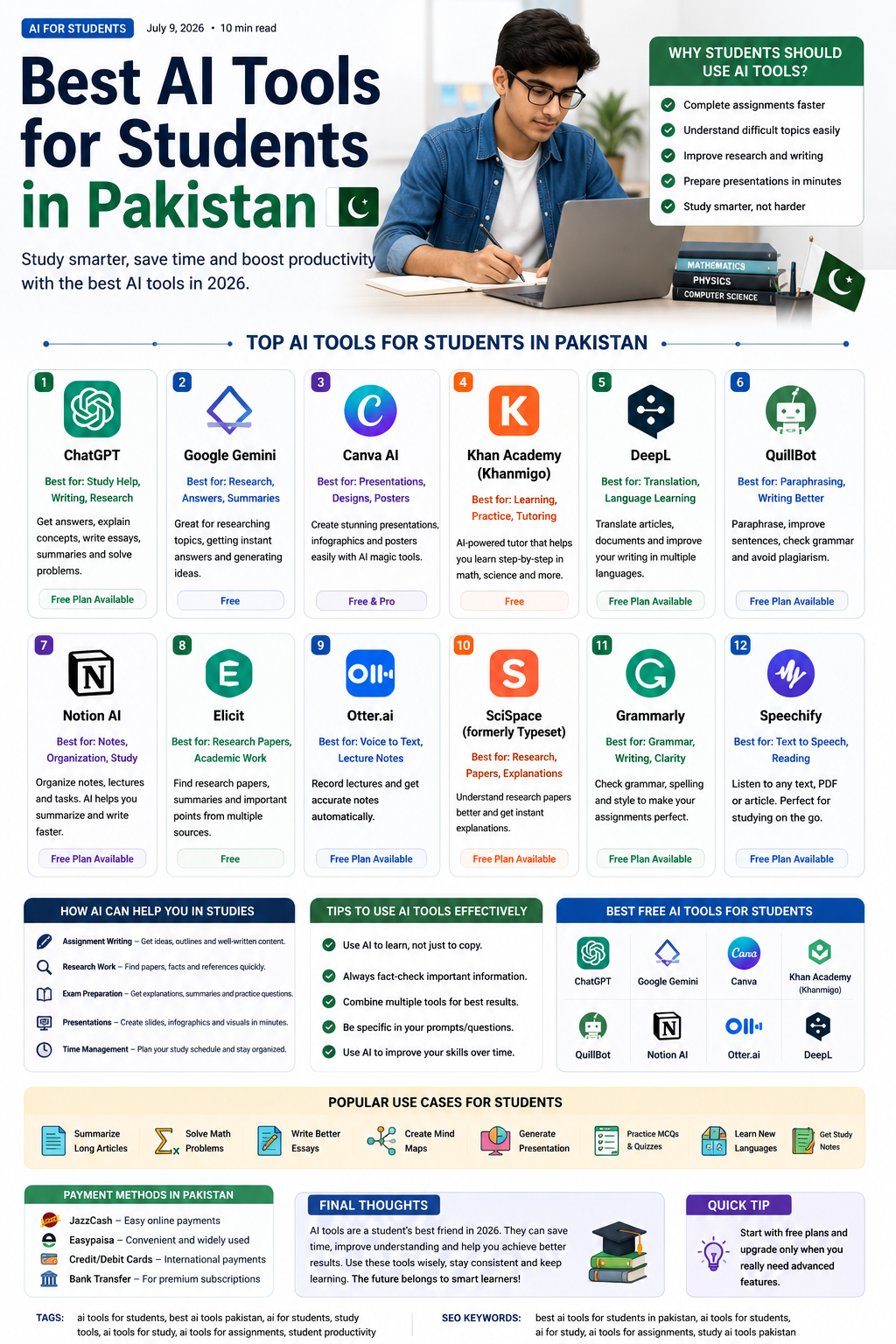
The best AI tools for students in Pakistan in 2026 are ChatGPT, Gemini, NotebookLM, Google AI Studio, Grammarly, Canva, Perplexity, Claude, DeepSeek, and QuillBot.
For most students, the best starting combination is ChatGPT, NotebookLM, Canva, and Grammarly. These tools can help with study, notes, writing, presentations, and revision.
AI is not a replacement for hard work. It is a study partner. Students who use AI to learn, practice, and improve will get the most benefit.